All the resources and support options you need are gathered here—so you can get up and running quickly, use the product with confidence, and get timely help whenever you need it.
Service & Support

Community
A hub for real-world scenarios, practical tips, DIY mods, and proven troubleshooting knowledge—shared by the community for the community.。

Wiki
We’re building an all-in-one knowledge hub, so we’ll be gradually reviewing, updating, and migrating content from the legacy Wiki into our new Community and Courses—making it easier to find what you need and learn in a clearer, more structured way. We’ll also introduce an AI assistant to help you diagnose issues faster and get the right solution, so you can receive support and answers as soon as you need them.
Download Center



FAQ
Find answers to the most common technical questions, with standard step-by-step guidance to help you quickly identify the cause and resolve issues.
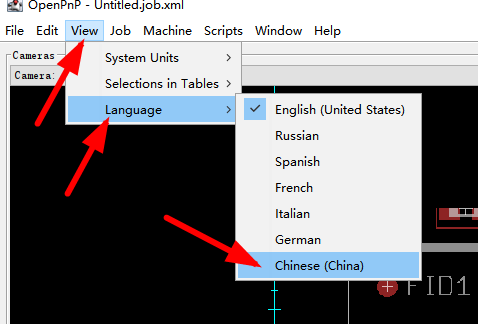
As shown below, click OK in the pop-up message, then restart OpenPnP to apply the change.
This happens because your PCB height is set to a positive value. In reality, the correct PCB height should be negative—change it to a negative value and it will work properly.
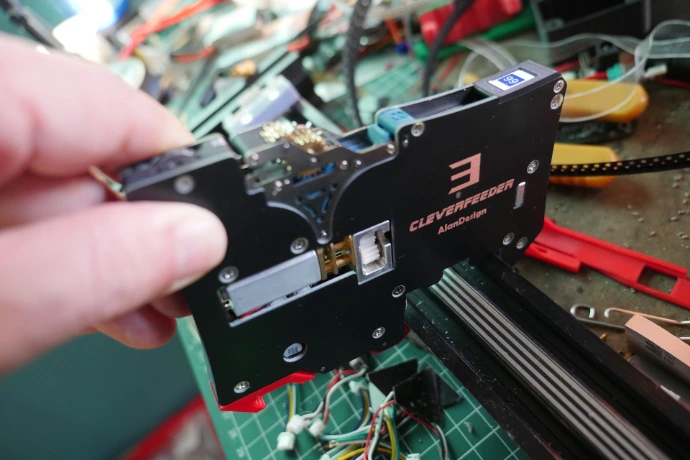
If the E-stop indicator is flashing rapidly, it’s usually because the emergency stop button is pressed, or because during homing (returning to HOME) the N1 axis starts from an incorrect position and fails to trigger the Z-axis sensor switch, which triggers an alarm. In the second case, you’ll often hear a very distinctive sound: the N1 axis drops significantly, then is pulled back by the spring and taps the placement head. Press the reset button, gently lift and straighten the N1 axis, then perform a soft restart.
Events & Updates
We regularly share official events and the latest updates here—new releases, feature updates, live sessions/training, and community activities. Follow along and join us.
Book an Appointment
Book a support session here, and we’ll schedule a 1-on-1 meeting at a time that works for you. We’ll quickly diagnose your setup and use case, provide targeted guidance, and help you resolve issues faster and keep things moving.
Contact Us
If you need help, please reach out using the contact options below. (Business hours: Mon–Sat, 9:00–11:30 and 14:00–17:00.)
Phone Support
For purchase inquiries, complaints, or feedback, please call us during business hours.
Chinese (Mandarin) support: +86 186 0105 3075
Ticket Support
Submit a ticket anytime—no business-hours restriction. You can attach photos, short videos, and other details so we can fully analyze the issue and provide a solution. For most problems, this is the recommended option.
Live Support (Recommended)
We respond in real time during business hours—whether it’s a sales question or technical support. Click the blue “…” icon in the bottom-right corner of your screen to chat with us.
Where to Buy
To ensure authenticity and full after-sales support, please purchase through our official and authorized channels, including our online store, official shops, and approved distributors.
Ticket Support
Submit a ticket anytime—no business-hours restriction. You can attach photos, short videos, and other details so we can fully analyze the issue and provide a solution. For most problems, this is the recommended option.