
一键部署工具 下载地址:(One-Click-Deployment.zip download link)
我们专为 TornadoSMT用户制作了一个.py脚本,可以帮助自动完成OpenPnP所需配置文件的部署,简化导入操作。
该脚本将初始化 .openpnp2 文件夹并更新U盘中的config.txt 文件,提高配置效率与准确性。
核心功能
✅ 自动清理与备份
自动清理并备份原始 .openpnp2 文件夹,确保数据安全与可追溯。
✅ 配置文件自动部署
自动下载、解压配置文件包,自动导入配置文件,一键完成部署。
✅ 注入新脚本
新增相机初始化以及底部曝光调整所需的脚本、新增一键备份和Z轴配平计算器脚本。
✅ 配平参数迁移、版本更新与备份
迁移U盘原config.txt中的配平参数至新配置文件,并对齐完成版本更新与备份。
✅ 跨平台支持
兼容 Windows、macOS 和 Linux 系统,满足不同操作系统需求。
✅ 中英文双语界面
内置中英文双语界面,方便全球用户。
使用方法
务必打开贴片机电源开关。
启动 OpenPnP 软件,在顶部菜单栏中选择 「脚本」→「打开脚本目录」。
将zip包中的 TornadoSMT 文件夹解压或复制粘贴到刚刚打开的scripts目录中。
返回 OpenPnP 顶部 「脚本」 菜单,点击「TornadoSMT」中的「One-Click-Deployment.py」脚本。
点击弹窗右下角的「继续」按钮,等待自动配置流程结束。
结束后,按照要求,完成:(下图所示)
➡️长按贴片机底部的复位开关 3 秒钟,
➡️点击「退出」按钮,同时将同步退出OpenPnP软件。
➡️请重新启动 OpenPnP 软件,完成后续的初始化教程。
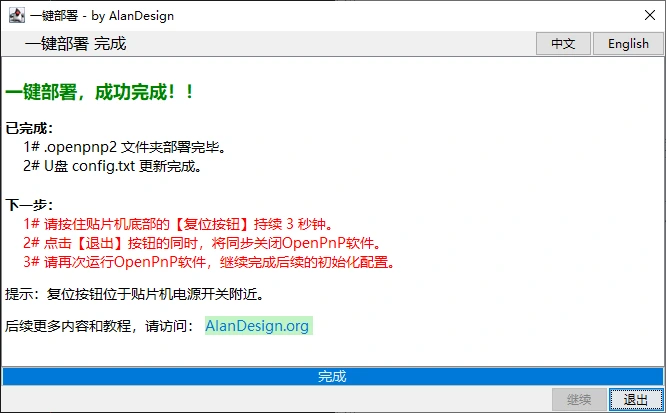
过程演示

We have created a .py script specifically for TornadoSMT users, which can help automate the deployment of the configuration files required by OpenPnP, simplifying the cumbersome import process.
This script will initialise the .openpnp2 folder and update the config.txt file on the USB drive, improving configuration efficiency and accuracy.
Core features
✅ Automatic cleaning and backup
Automatically clean and back up the original .openpnp2 folder, ensuring data security and traceability.
✅ Automatic deployment of configuration files
Automatically download and extract the configuration file package, automatically import the configuration files, and complete the deployment with one click.
✅ Inject new scripts
New scripts for camera initialisation and bottom exposure adjustment, as well as a one-click backup and Z-axis calibration calculator script.
✅ Calibration parameter migration, version updates and backups
Migrate calibration parameters from the original config.txt on the USB drive to the new configuration file, and align to complete version updates and backups.
✅ Cross-platform support
Compatible with Windows, macOS, and Linux systems, meeting the needs of different operating systems.
✅ Bilingual interface in Chinese and English
Built-in bilingual interface in Chinese and English, convenient for users worldwide.
Usage instructions
Be sure to turn on the power switch of the machine.
Launch the OpenPnP software and select "Scripts" → "Open Script Directory" on the top of OpenPnP menu.
Extract or copy and paste the TornadoSMT folder from the zip package into the newly opened scripts directory.
Return to the "Scripts" menu, and click on "TornadoSMT" to select "One-Click-Deployment.py".
Click the "Continue" button at the bottom right of the pop-up window and wait for the automatic configuration process to finish.
After completion, please follow the requirements to finish: (as shown in the image below)
➡️ Press and hold the Reset Button at the bottom of the machine for 3 seconds,
➡️ Click the "Exit" button, which will also synchronously exit the OpenPnP software.
➡️ Please restart the OpenPnP software and follow the subsequent initialisation tutorial.
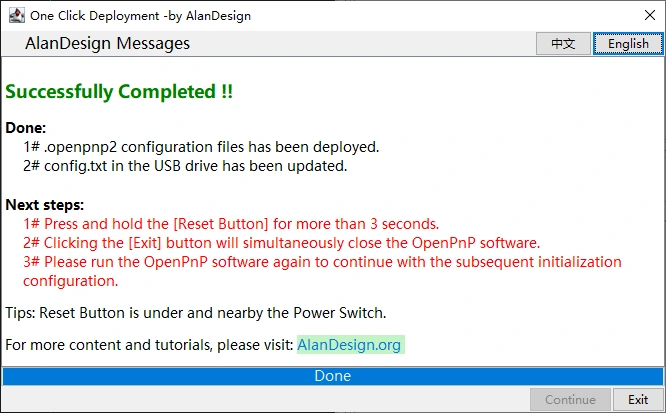
Process demonstration