One-Click Deployment
We have created a .py script specifically for TornadoSMT users, which can help automate the deployment of the configuration files required by OpenPnP, simplifying the cumbersome import process.
This script will initialise the .openpnp2 folder and update the config.txt file on the USB drive, improving configuration efficiency and accuracy.
Download script:
Core features
✅ Automatic cleaning and backup
Automatically clean and back up the original .openpnp2 folder, ensuring data security and traceability.
✅ Automatic deployment of configuration files
Automatically download and extract the configuration file package, automatically import the configuration files, and complete the deployment with one click.
✅ Inject new scripts
New scripts for camera initialisation and bottom exposure adjustment, as well as a one-click backup and Z-axis calibration calculator script.
✅ Calibration parameter migration, version updates and backups
Migrate calibration parameters from the original config.txt on the USB drive to the new configuration file, and align to complete version updates and backups.
✅ Cross-platform support
Compatible with Windows, macOS, and Linux systems, meeting the needs of different operating systems.
✅ Bilingual interface in Chinese and English
Built-in bilingual interface in Chinese and English, convenient for users worldwide.
Usage instructions
Be sure to turn on the power switch of the machine.
Launch the OpenPnP software and select "Scripts" → "Open Script Directory" on the top of OpenPnP menu.
Extract or copy and paste the TornadoSMT folder from the zip package into the newly opened scripts directory.
Return to the "Scripts" menu, and click on "TornadoSMT" to select "One-Click-Deployment.py".
Click the "Continue" button at the bottom right of the pop-up window and wait for the automatic configuration process to finish.
After completion, please follow the requirements to finish: (as shown in the image below)
➡️ Press and hold the Reset Button at the bottom of the machine for 3 seconds,
➡️ Click the "Exit" button, which will also synchronously exit the OpenPnP software.
➡️ Please restart the OpenPnP software and follow the subsequent initialisation tutorial.
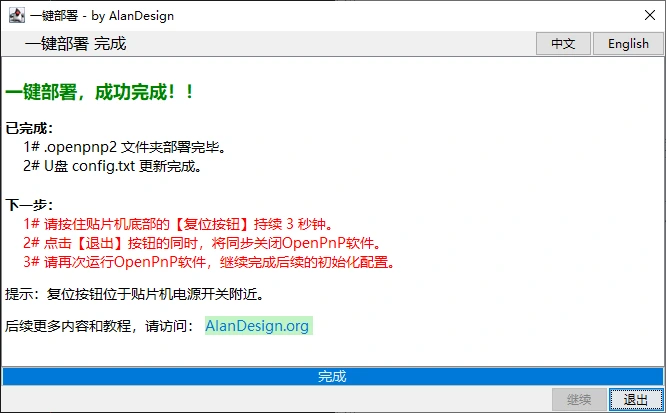
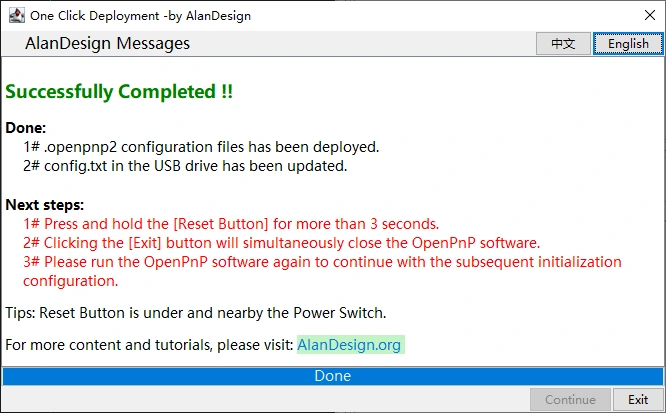
Process demonstration

目前没有任何评论。
成为第一个发表评论的人。