
English version, please read down.(英文版本,请向下翻阅)
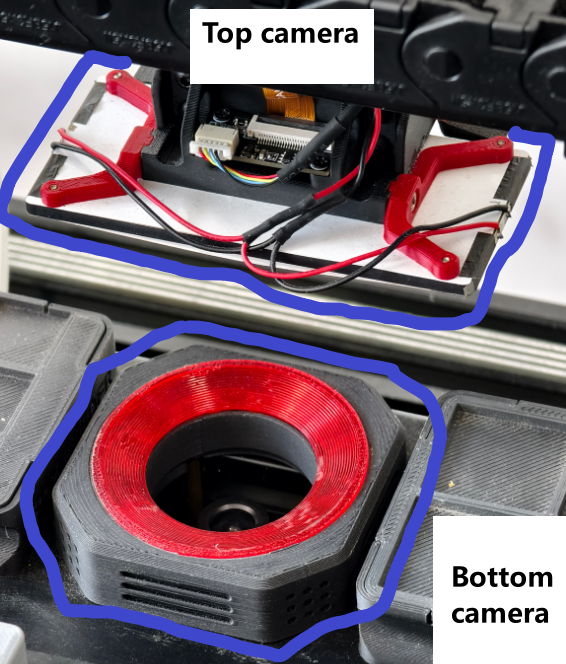
TornadoSMT_V2.1,底部相机和顶部相机的 实物照片:
- 底部相机为定焦版本,即焦距不可通过软件进行调节,出厂时,焦距已经调好。
- 顶部相机具备一个明显很宽大的补光灯。
相机的名称异常
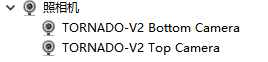
1、在设备管理器的照相机选项中:
- 底部相机的正确名称:TORNADO-V2 Bottom Camera
- 顶部相机的正确名称:TORNADO-V2 Top Camera
2、可能由于操作系统兼容性的问题:
- 底部相机会被错误识别为:HBVCAM Camera。
- 顶部相机会被错误识别为:USB HD Camera。
3、如何解决:
- 请前往下载上方我们提供的固件更新工具,
- 对名称有误的相机,进行做一次固件升级,即可一次性解决底部相机名称错误的问题。
4、准备工作:
- 准备工作:需要使用Windows操作系统电脑,下载并解压上方固件至文件夹,文件夹位置随意。
- 将相机全部接入电脑。
5、升级固件
- 以升级底部相机为例,顶部相机的操作,与下方操作相同;
- 运行解压后的底部相机刷机软件 UvcCamDownload.exe;
- 在Camera IC下拉列表中,选择任意选择一条相机的VID&PID信息;
- 如果VID&PID信息为底部相机的,软件会自动在上方加载并显示所需的固件;
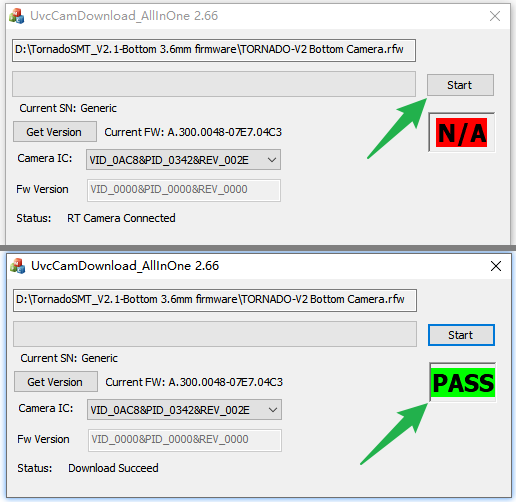
- 点击Start按钮,开始升级,直至结束,当软件状态会显示为 PASS,即代表升级成功(下图所示);
- 前往设备管理器,查看并确认当前连接的相机名称是否变为:TORNADO-V2 Bottom Camera;
- 如果名称未变化,请在该相机,鼠标右键-卸载设备,然后点击设备管理器上方的 扫描检测硬件改动 按钮;
- 让电脑重新识别一次该相机,此时,正确的名称便会显示出来。
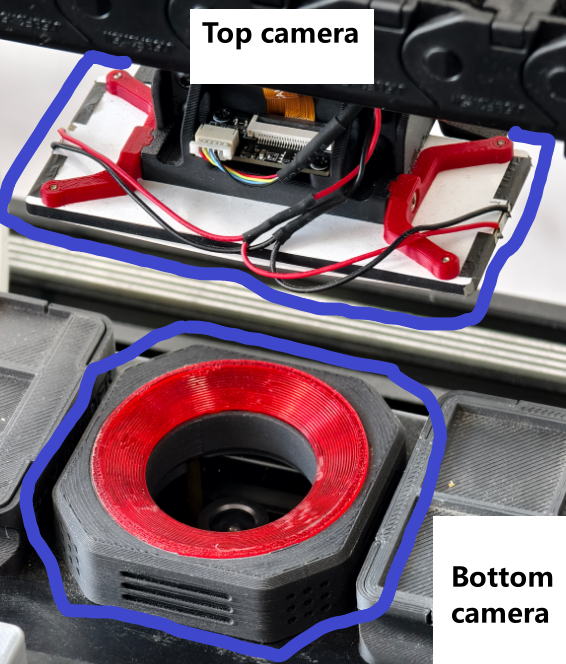
TornadoSMT_V2.1, Physical Photos of Bottom Camera and Top Camera:
The bottom camera is a fixed-focus version, which means the focal length cannot be adjusted via software and has been pre-calibrated at the factory. The top camera is equipped with a noticeably large fill light.
Abnormal Camera Names 1. In the "Cameras" option of Device Manager: Correct name for the bottom camera: TORNADO-V2 Bottom Camera Correct name for the top camera: TORNADO-V2 Top Camera 2. Possible issues due to operating system compatibility: The bottom camera may be incorrectly recognized as: HBVCAM Camera. The top camera may be incorrectly recognized as: USB HD Camera. 3. How to resolve: Firmware download address Please download the firmware update tool provided above, and perform a firmware upgrade on the camera with the incorrect name to resolve the bottom camera's name issue in one go. 4. Preparation: Preparation: A computer with Windows operating system is required. Download and extract the above firmware to a folder (any location is fine). Connect all cameras to the computer. 5. Firmware Upgrade Taking the bottom camera upgrade as an example, the operation for the top camera is the same: Run the extracted bottom camera flashing software UvcCamDownload.exe; In the "Camera IC" dropdown list, select any camera's VID&PID information; If the VID&PID information belongs to the bottom camera, the software will automatically load and display the required firmware at the top; Click the "Start" button to begin the upgrade until completion. When the software status shows "PASS", it means the upgrade is successful (as shown in the image below); Go to Device Manager to check and confirm whether the currently connected camera's name has changed to: TORNADO-V2 Bottom Camera; If the name does not change, right-click on the camera - "Uninstall device", then click the "Scan for hardware changes" button at the top of Device Manager; Let the computer re-recognize the camera, and the correct name will be displayed at this point.